this.fv_suppress = 0;

this.work01_oninit = function(obj:nexacro.Form,e:nexacro.EventInfo)
{
};

////////////////////////////////////////////////
this.btnTemp_ondrag = function(obj:nexacro.Button,e:nexacro.DragEventInfo)
{
    trace("[from] btnTemp_ondrag", "start");

    return true;
};


this.grdList_ondrag = function(obj:nexacro.Grid,e:nexacro.GridDragEventInfo)
{
    trace("grdList_ondrag", "start");

    ////////////////////////////////////////////
    var bindColid = obj.getCellProperty("body", e.cell, "text");
    bindColid = bindColid.replace("bind:", "");
    trace("bindColid", bindColid);
    var headtext = obj.getCellProperty("head", e.cell, "text");
    trace("headtext", headtext);

    obj._headtext = headtext;
    obj._col = e.col;
    obj._cell = e.cell;
    obj._bindColid = bindColid;
    ////////////////////////////////////////////

    return true;
};

this.divGrp_ondrop = function(obj:nexacro.Div,e:nexacro.DragEventInfo)
{
    trace("[to] divGrp_ondrop", "start");
    var text_org = obj.text;

    //  var id = e.sourceobject.id;
    //  var val = e.sourceobject.text;

    var col = e.sourceobject._col;
    var cell = e.sourceobject._cell;
    var headtext = e.sourceobject._headtext;
    var bindColid = e.sourceobject._bindColid;

    trace("sourceobject col ==>", col);
    trace("sourceobject cell ==>", cell);
    trace("sourceobject headtext ==>", headtext);
    trace("sourceobject bindColid ==>", bindColid);

    if(this.gfn_isNull(text_org)){
    	obj.set_text(headtext);
    }else{
    	obj.set_text(text_org + ","+ headtext);
    }

    this.fnSetGroup(bindColid, cell);

    return true;
};


this.fnSetGroup = function(bindColid, cell){
    var nCellIdx = -1;
    var keystring_org = this.ds_Employee.keystring;
    var sKeyString = "";

    if(this.gfn_isNull(keystring_org)){
    	sKeyString = "G:+"+bindColid;
    }else{
    	sKeyString = keystring_org+"+"+bindColid;
    }
    trace("sKeyString===>", sKeyString);
    this.ds_Employee.set_keystring( sKeyString );


    this.fv_suppress++;

    //  nCellIdx = this.grdList.getBindCellIndex("body", bindColid);
    //  this.grdList.setCellProperty("body", nCellIdx, "suppress", this.fv_suppress);

    this.grdList.setCellProperty("body", cell, "suppress", this.fv_suppress);


    trace("this.fv_suppress", this.fv_suppress);
    trace("nCellIdx", nCellIdx);

}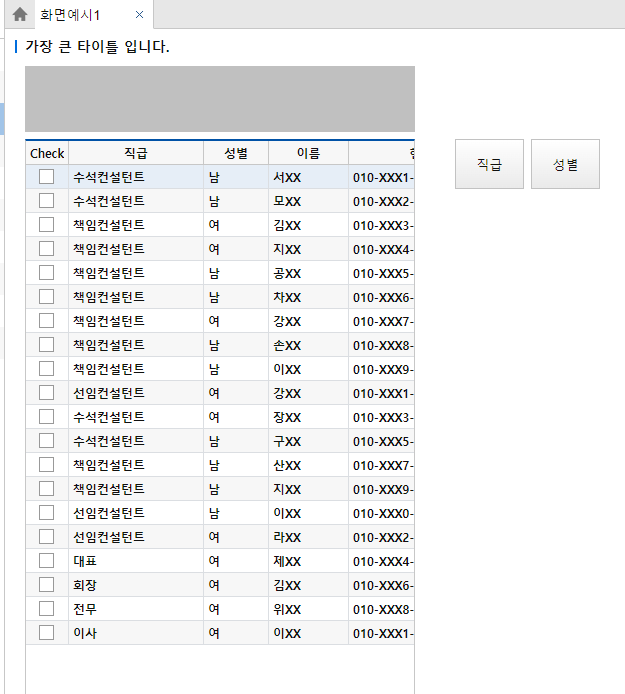
그리드 타이틀 드래그 to divGrp
작업후 모습

[ 나중에 시간나면 변경해볼 방향 ]
- divGrp 내 text 로 표시하던 방식을 => divBtn 을 추가 (divBtn 내 btnGrpType, btnGrpX ) 하는 방식으로
- keystring 및 suppress 방식을 => 그리드 트리방식으로 표시
- suppress 방식일 경우 기존 grdList 에 디자인된 suppress 순서 기억해서 group 풀어줄때 사용하기
'web > nexacro' 카테고리의 다른 글
| [nexacro]MultiCombo (0) | 2024.01.13 |
|---|---|
| [nexacro]공지팝업 localStorage 이용하기 (0) | 2023.12.26 |
| FileDialog >> get 파일 Blob >> set FormData >> send XMLHttpRequest (0) | 2023.08.29 |
| 업로드하기 전에 미리보기 하는 방법 ( 참조 링크 ) (0) | 2023.06.28 |
| index.html / quickview.html / launch.html / popup.html (0) | 2023.06.27 |